
Microcontroller (MCU) Guide: Architecture, Programming, Industrial Use, and Troubleshooting
Nov 13, 2025
Introduction
Microcontrollers (MCUs) are the tiny engines that make modern electronics work. They power everything from home appliances to industrial automation. This guide goes over what microcontrollers are, how they work, their architecture, programming, industrial uses, popular families, and how to fix problems with them. Each section is clearly defined so that you can fully understand MCUs without any extra information.
What Is a Microcontroller?
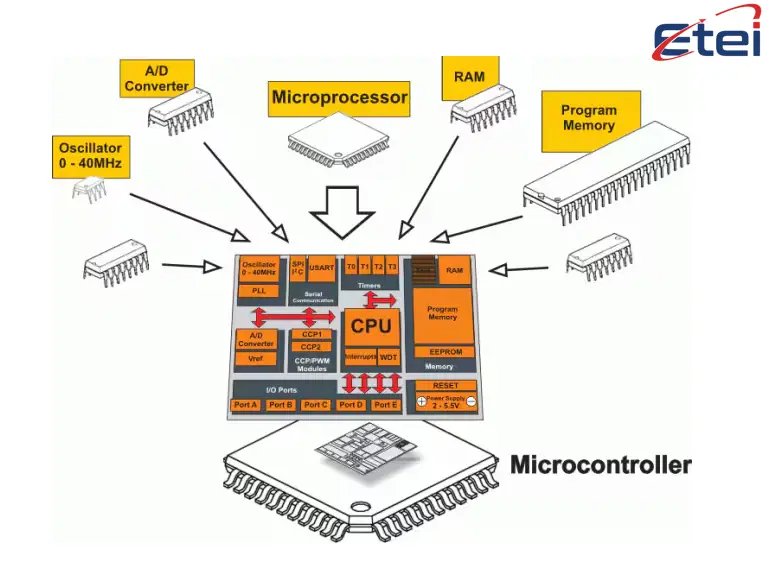
A Simple Definition
Microcontrollers are the tiny computers that make most of the electronics we use every day work. These tiny chips quietly handle tasks and respond to inputs in everything from your microwave and washing machine to your car's dashboard and fitness tracker. But what is a microcontroller, exactly?
A microcontroller, or MCU for short, is a small computer that is built onto a single chip. It is meant to do certain control tasks in a bigger system. Microcontrollers are different from the general-purpose processors that are in laptops and smartphones because they are designed to be more efficient, reliable, and use less power. They aren't made to do more than one thing at a time; they're made to do one thing well.
What’s Inside the Chip?
A CPU (central processing unit), memory, and input/output (I/O) interfaces are the three main parts of every microcontroller. The CPU follows the instructions, the memory stores the program and temporary data, and the I/O pins let the chip talk to the outside world by reading sensors, controlling motors, blinking LEDs, or sending signals to other devices.
Here's a quick comparison to help you understand how microcontrollers and microprocessors are different:
| Feature | Microcontroller | Microprocessor |
|---|---|---|
| Integration | CPU + memory + I/O on one chip | CPU only; needs external components |
| Purpose | Dedicated control tasks | General-purpose computing |
| Power Consumption | Low | Higher |
| Cost | Low | Higher |
| Common Applications | Appliances, IoT, vehicles | PCs, smartphones |
Where You’ll Find Them
Microcontrollers have been around since the 1970s, and early models like Intel's 8051 helped make them possible. They are now faster, smaller, and use less energy, and they are everywhere.
-
- Washing machines and microwaves are examples of home appliances.
-
- Remote controls and fitness trackers are examples of consumer electronics.
-
- Automotive systems that control the engine, lights, and safety features
-
- Medical devices that check vital signs or give medicine
-
- Smart thermostats, door sensors, and connected wearables are examples of IoT devices.
Arduino is a great platform for beginners and prototyping. ESP32 is great for wireless applications, and STM32 is used in professional and industrial settings. They all have their own strengths, but they all want to control and respond to the world around them.
In short, microcontrollers are the brains of the operation. They don't need screens or keyboards; they just need to be able to do a job well, reliably, and quickly.
Microcontroller Architecture and Key Components
What’s Inside a Microcontroller?
To understand how microcontrollers work, it's helpful to look inside the chip. Most microcontrollers have the same basic parts, but some are harder to use than others. These parts work together to process data, talk to the outside world, and do tasks reliably, often in real time.
The CPU, or central processing unit, is the most important part of a microcontroller. This is the part that follows orders and makes decisions. It is usually much simpler than the processor in a laptop or smartphone, but it is better for control tasks than general computing. Next to the CPU, there is also memory. This is usually a combination of RAM for short-term data and Flash or EEPROM for long-term storage of program code.
Microcontrollers can also connect to the real world through their input and output ports. These I/O pins can read sensor signals, control motors, blink LEDs, or send and receive messages from other devices. Some pins are digital, some are analog, and you can set up a lot of them to do different things depending on what you need them for.
Built-In Features That Make It Work
Most microcontrollers have extra features that make them more useful, in addition to the main parts:
-
- Timers and counters to keep track of events and time correctly
-
- Analog-to-digital converters (ADCs) read data from sensors that work in analog mode.
-
- PWM outputs for turning LEDs down or controlling motors
-
- Clock systems to keep track of time inside, and communication modules like UART, SPI, and I²C Modes that save power to make the battery last longer
These extras make it easier to build small, efficient systems and cut down on the need for outside parts.
Architecture Styles and a Real-World Example
Microcontrollers use two main types of architecture. The Harvard architecture keeps program memory and data memory separate, which makes it faster to get to and better at what it does. The Von Neumann architecture uses one memory space for both, which is easier but might be slower. Most modern MCUs use the Harvard model because it works better for tasks that are built into them.
A good example of a well-designed microcontroller is the STM32 family from STMicroelectronics. There are many different types of these chips, from low-power ones to high-performance ones with advanced peripherals like USB, CAN, and Ethernet. All of them have ARM Cortex-M cores. Tools for development, like STM32CubeIDE, make it easier for them to set up and program.
Here is a short list of what STM32 can do:
| STM32 Feature | Description |
|---|---|
| Core Types | ARM Cortex-M0, M3, M4, M7 |
| Peripheral Options | USB, CAN, Ethernet, ADC, DAC, Timers |
| Development Tools | STM32CubeIDE, STM32CubeMX, HAL libraries |
| Use Cases | Industrial control, robotics, consumer devices |
If you know how a microcontroller is put together, you can choose the best one for your project. Knowing what's inside the chip lets you choose the right features for your project, whether it's a simple sensor or a complex industrial controller. You won't be surprised later if you do this.
Programming Microcontrollers: Tools, Languages, and IDEs
How Microcontrollers Are Programmed
Writing instructions for a microcontroller tells it what to do. For example, it might blink an LED, read a sensor, or control a motor. Microcontrollers only run one program that runs all the time. It takes inputs and updates outputs in real time, unlike regular computers.
Most microcontrollers are programmed in C or C++, which let you directly control hardware and use memory efficiently. Some platforms, like Arduino, make things easier by having libraries and syntax that are easy for beginners to understand.
MicroPython and other languages let you write code in Python, which is a great way to quickly build and test ideas.
There are a few steps to this process: writing code on a computer, turning it into instructions that the computer can read, and then sending it to the microcontroller through a USB or serial connection. After loading the program, the microcontroller runs it on its own every time it turns on.
Tools and Environments You’ll Use
Integrated development environments (IDEs) are software programs that let you edit, compile, debug, and upload code all in one place. They make programmers' jobs easier. Most of the time, each family of microcontrollers has its own IDE.
-
- Arduino IDE: Simple to use and great for beginners; good for projects that don't take long
-
- STM32CubeIDE is a complete environment for STM32 chips that includes graphical tools for setting things up.
-
- Microchip's PIC and AVR microcontrollers use MPLAB X.
-
- PlatformIO is an IDE that works on many different platforms and with many different types of microcontrollers.
-
- Mu or Thonny Editor: Light editors for boards that run MicroPython
Most of the time, these environments come with libraries and examples that you can use right away. A lot of them also have debugging tools that let you go through your code one line at a time and see how variables change in real time. This is very helpful for finding and fixing bugs.
Choosing the Right Language and Platform
Your goals will determine which programming language and tools you use. Arduino and C++ might be all you need to make a simple prototype. If you're using C for business, you'll probably use a vendor-specific IDE and hardware abstraction libraries.
Platforms like ESP32 and MicroPython come with built-in support for Wi-Fi and Bluetooth if you're working with connected devices.
Here’s a quick comparison of popular programming options:
| Language/Platform | Best For | Pros | Limitations |
|---|---|---|---|
| Arduino (C++) | Beginners, quick prototyping | Easy to learn, large community | Limited low-level control |
| STM32 (C) | Industrial, professional systems | Powerful, flexible | Steeper learning curve |
| MicroPython | IoT, education, rapid development | Readable syntax, fast testing | Slower performance, limited support |
| PIC/AVR (C) | Legacy systems, embedded control | Mature tools, stable | Less modern ecosystem |
Programming microcontrollers is both an art and a science. It takes paying attention to details, knowing how hardware works, and being able to write code that works well and is reliable. But once you get the hang of it, you'll be able to make your ideas come to life with just one line of code.
Microcontrollers in Industrial Applications
Why Industries Use Microcontrollers
Microcontrollers aren't just good for hobby projects and consumer electronics; they're also necessary in industrial systems where accuracy, reliability, and real-time control are very important. These chips do things that keep things running smoothly, like managing energy and automating factories.
Microcontrollers are built into factory machines to control motors, read sensor data, set off alarms, and keep an eye on the temperature. They respond quickly to changes, which makes them great for systems that need quick timing and feedback loops.
For example, a microcontroller could change the speed of a conveyor belt based on how heavy a package is, or it could turn off a system if the pressure reading gets too high.
Microcontrollers used in industrial settings need to be able to handle heat, electrical noise, and long hours of operation. Many have been certified to meet safety standards like IEC 61508, which is very important for applications where people are at risk.
Communication and Control
Businesses need microcontrollers because they let machines talk to each other. They can use protocols such as Ethernet, Modbus, RS-485, and CAN bus. These protocols let devices share data safely, even in loud places or over long distances. This kind of link is what makes automation possible today.
Here are some of the most common ways that businesses talk to each other:
| Protocol | Use Case | Strengths |
|---|---|---|
| CAN Bus | Automotive, robotics | Robust, real-time messaging |
| Modbus | PLCs, sensors, actuators | Simple, widely supported |
| RS-485 | Long-distance serial communication | Noise-resistant, multi-drop |
| Ethernet | High-speed industrial networking | Fast, scalable, internet-ready |
Microcontrollers also handle control logic, which means they turn inputs into actions. They make decisions based on programmed rules and real-time feedback, whether it's opening a valve, changing the speed of a motor, or logging data from a sensor.
Popular Microcontroller Families and Ecosystems
Choosing the Right Microcontroller
There are so many microcontrollers on the market today that it can be hard to choose the right one. Every family has its own strengths, weaknesses, and set of tools. Some are made for beginners, while others are made for heavy use in factories. The most important thing is to make sure that the microcontroller can do what your project needs it to do, whether that's communicate wirelessly, use less power, or work with advanced peripherals.
Microcontrollers are usually put into families based on how they are built, who makes them, and what development tools they support. These families usually have a variety of models, from basic chips to high-performance ones. All of them have similar programming environments and documentation.
Common MCU Families and What They Offer
Here are some of the most widely used microcontroller families:
-
- Arduino (based on AVR): Good for beginners and making quick prototypes. Easy to set up, a big community, and a lot of tutorials.
- ESP32 (Espressif): It has built-in Wi-Fi and Bluetooth, which makes it great for IoT and wireless projects. Works with MicroPython and Arduino.
-
- STM32 (STMicroelectronics): High-quality ARM Cortex-M chips with a lot of extra features. Used in both consumer and industrial electronics.
-
- Microchip's PIC and AVR are reliable and widely used in embedded systems. MPLAB X IDE supports it.
-
- Texas Instruments MSP430: Known for using very little power, it is often used in battery-powered and sensing applications.
Each family has its own development environment, which includes IDEs, libraries, tools for finding bugs, and help from other people. STM32 developers, for instance, often use STM32CubeIDE and STM32CubeMX to set up peripherals and make boilerplate code. Users of the ESP32 can use the Arduino IDE, PlatformIO, or even environments based on Python.
Here’s a quick comparison of popular families:
| Family | Best For | Key Features | Ecosystem Tools |
|---|---|---|---|
| Arduino | Beginners, education | Simple setup, large community | Arduino IDE, PlatformIO |
| ESP32 | IoT, wireless applications | Wi-Fi, Bluetooth, dual-core CPU | Arduino IDE, MicroPython |
| STM32 | Industrial, professional use | ARM Cortex-M, rich peripherals | STM32CubeIDE, STM32CubeMX |
| PIC/AVR | Embedded control systems | Stable, mature, low-cost | MPLAB X, XC8 compiler |
| MSP430 | Low-power sensing | Ultra-low power, compact design | Code Composer Studio |
Troubleshooting Microcontroller Issues
Where Problems Usually Start
Even the best-planned microcontroller system can have problems. Sometimes the problem is clear, like a wire that isn't tight or a resistor that isn't there. Sometimes it's hidden deep in the firmware or happens because of small timing problems. When you troubleshoot, you start with the simplest options and work your way up to the more complicated ones.
A lot of the time, power problems are the first thing that comes up. If the microcontroller doesn't get a steady, clean voltage, it might reset itself, not start up, or act strangely. A multimeter can quickly tell you if the power supply's voltage is safe. Putting decoupling capacitors close to the power pins is an easy way to stop noise and voltage drops.
Another common cause is problems with the clock. If the oscillator isn't set up right or the crystal is broken, the microcontroller might not even turn on. An oscilloscope can help you save a lot of time by checking for a stable clock signal. Even code that is perfectly written won't run right if there isn't a reliable clock.
Common Symptoms and What They Mean
Here are some typical symptoms and what they often point to:
-
- Resetting at random or not starting → Power problems or brown-out conditions
-
- Peripherals that don't respond → Incorrectly set up I/O settings or pull-up resistors that aren't there
-
- Errors in communication → Baud rate mismatch, noise on the lines, or wrong protocol setup
-
- Code stops working or crashes → Bugs in the firmware, stack overflows, or unsafe functions like sprintf
-
- Pins that are too hot or broken → Too much current draw or wrong voltage levels
It's especially hard to misconfigure peripherals. If a UART won't send or an I²C bus looks dead, it's usually because the settings don't match or some hardware is missing. A logic analyzer can help you check to see if signals are being sent and received as they should be.
There will always be bugs in firmware. A system can stop working because of memory leaks, infinite loops, or unsafe function calls. For instance, careless use of sprintf on some Texas Instruments microcontrollers has been linked to crashes. Watchdog timers are a good way to protect your system. If the software hangs, they reset it so it can get back on track.
Conclusion: Why Microcontrollers Matter
Microcontrollers are small, but they have a big effect. They run the systems that control our cars, keep an eye on our health, automate our homes, and run our factories. Understanding microcontrollers makes technology smarter and more responsive, whether you're a hobbyist building your first robot or an engineer designing industrial control systems.
In this guide, we've talked about what microcontrollers are, how they work, where they're used, and how to program and fix them. We looked at well-known families like STM32, ESP32, and Arduino, as well as the tools and methods that make development easier and faster.
Microcontrollers are more than just chips; they help new ideas come to life. They let us make things that can sense, think, and do things. They show us how hardware and software work together. They also push us to be creative, come up with new ways to solve problems, and make systems that make life better.
Microcontrollers give you the power and freedom to make things happen, whether you're designing a wearable, automating a greenhouse, or building a smart energy grid. And as technology keeps changing, these little computers will always be at the center of the systems that shape our world.
Vorheriger BeitragBeginner’s Guide to Capacitors
Nächster BeitragBridge Rectifier Explained: Circuit Diagram, Applications, and Troubleshooting Guide
Ähnliche
Flip-flops are digital circuits that sto..

Sensors detect changes in the environmen..
Oscillators are circuits that generate r..

Thermopiles are sensors that convert hea..

CR123 and CR123A batteries are the same ..

The L1154F is an alkaline button cell, s..
HOT

Telephone cables (RJ11) connect landline..

AG10 battery equivalents include 189, LR..

Battery testers check battery health by ..

Switch poles control how many circuits a..

Learn how to strip a wire safely and eff..